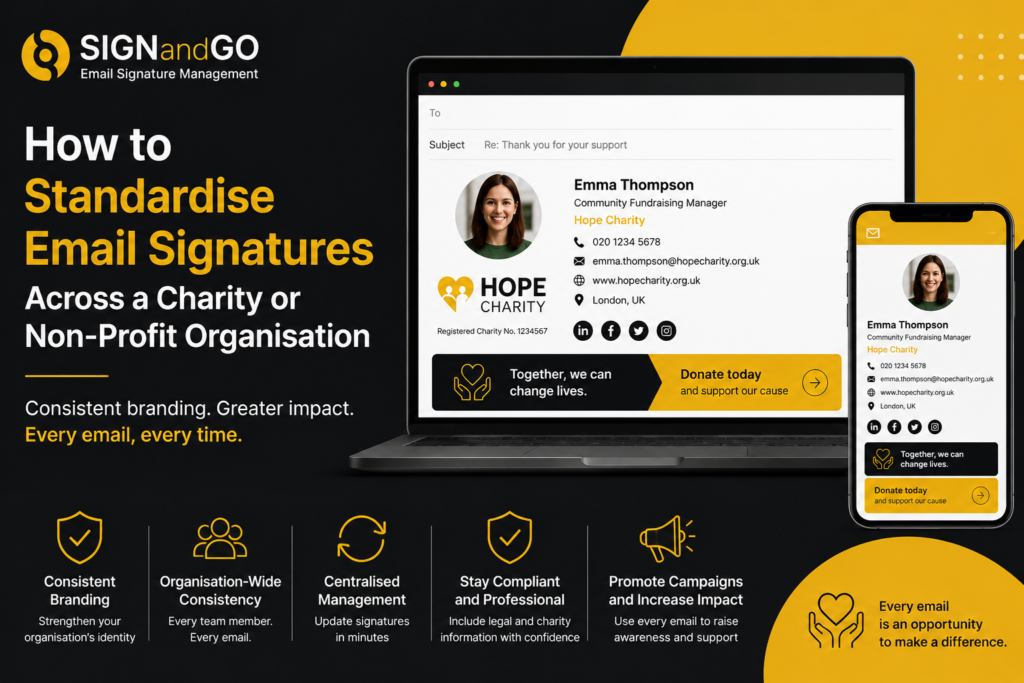
How to Standardise Email Signatures Across a Charity or Non-Profit Organisation
For charities and non-profit organisations, every interaction matters. Whether you’re communicating with donors, volunteers, beneficiaries or corporate partners, your email signature represents your organisation and reinforces your brand.
The challenge is maintaining consistency when staff work remotely, volunteers come and go, and multiple departments send thousands of emails every month.
Without centralised management, email signatures quickly become outdated, inconsistent or non-compliant.
This guide explains why standardised email signatures are important for charities and how organisations can manage them efficiently across Microsoft 365.
Why Email Signatures Matter for Charities
An email signature is more than contact information.
It serves as a digital business card, reinforcing trust and professionalism while giving recipients immediate access to your organisation’s website, social media channels and fundraising campaigns.
For charities, signatures can also:
- Increase awareness of current fundraising initiatives
- Promote upcoming events
- Encourage donations
- Direct supporters to volunteering opportunities
- Reinforce consistent branding across every communication
When every employee and volunteer uses a different format, those opportunities are often missed.
The Challenge of Managing Signatures Across Multiple Teams
Many charities operate with:
- Office-based employees
- Remote workers
- Volunteers
- Trustees
- Regional offices
- External consultants
Each group may create or edit their own email signature manually.
Over time this leads to inconsistent logos, outdated phone numbers, missing legal disclaimers and different branding styles across the organisation.
For larger charities using Microsoft 365, manually updating signatures for dozens or hundreds of users quickly becomes an administrative burden.
Why Inconsistent Email Signatures Create Problems
Diluted brand identity
A strong visual identity builds recognition and trust.
If every employee uses different fonts, logos or layouts, recipients receive an inconsistent experience that weakens your organisation’s image.
Outdated contact details
Staff changes, role changes and office relocations happen regularly.
Manual signatures often remain unchanged long after information becomes inaccurate.
Missing compliance information
Many organisations include charity registration numbers, company details or legal disclaimers within their signatures.
If these are removed or edited by individuals, compliance risks increase.
Lost marketing opportunities
Every outbound email could promote a campaign or event.
Without central management, there is no reliable way to ensure campaign banners appear consistently across the organisation.
Supporting Fundraising Through Every Email
Your team already sends hundreds or thousands of emails every week.
Each one provides an opportunity to highlight your mission.
A professionally managed email signature can include:
- Donation links
- Seasonal fundraising campaigns
- Event registrations
- Volunteer recruitment
- Annual reports
- Awareness initiatives
Unlike traditional marketing campaigns, these messages are delivered naturally as part of everyday communication.
For organisations with limited marketing budgets, this creates valuable additional visibility without increasing workload.
The Difficulties of Manual Updates
When a campaign changes or branding is refreshed, updating signatures individually becomes time-consuming.
IT teams often receive repeated requests to:
- Replace logos
- Update telephone numbers
- Change job titles
- Add promotional banners
- Insert new legal wording
If changes rely on users updating Outlook signatures themselves, consistency cannot be guaranteed.
Volunteers and remote workers may never apply the latest version.
Centralised Email Signature Management for Microsoft 365
Modern email signature management platforms remove these challenges by allowing administrators to control signatures from a single location.
Instead of relying on individual users, templates can automatically pull information from Microsoft 365 and apply approved branding to every email.
Benefits include:
- Organisation-wide consistency
- Automatic user information updates
- Controlled banner campaigns
- Simplified onboarding
- Reduced IT workload
- Improved brand presentation
Changes can be deployed centrally without requiring employees to edit local Outlook signatures.
How SIGNandGO Helps Non-Profit Organisations
SIGNandGO enables charities and non-profit organisations to manage professional email signatures across Microsoft 365 from one intuitive platform.
Administrators can create branded templates, automate user details and roll out updates across the organisation in minutes.
Campaign banners can be updated centrally, helping communications teams promote fundraising initiatives without asking staff to make manual changes.
For organisations balancing limited resources with growing communication demands, centralised email signature management provides greater control while reducing administrative effort.
Best Practices for Charity Email Signatures
When designing organisation-wide signatures, consider the following recommendations:
- Keep branding consistent across all users
- Include direct contact information
- Display your organisation’s website prominently
- Add charity registration details where appropriate
- Include campaign banners sparingly and update them regularly
- Optimise layouts for desktop and mobile devices
- Automate user details wherever possible
A simple, professionally managed design often performs better than signatures overloaded with graphics or unnecessary information.
Frequently Asked Questions
What should a charity email signature include?
Typically, it should contain the sender’s name, role, organisation, contact information, website, logo and any required legal or charity registration details.
Can volunteers have the same branded email signature?
Yes. Centralised management allows volunteers and employees to use consistent branding while automatically applying the correct contact details.
How do charities update email signatures across Microsoft 365?
Using a central management platform such as SIGNandGO, administrators can deploy updates across all users without requiring manual changes on individual devices.
Can email signatures promote fundraising campaigns?
Yes. Banner images and links can be added to encourage donations, advertise events or raise awareness for specific initiatives.
Why is centralised email signature management useful for non-profits?
It reduces administrative work, improves brand consistency, helps maintain compliance and ensures every email supports the organisation’s communications strategy.
Standardise Your Charity’s Email Signatures with SIGNandGO
Your email signature should reinforce trust, professionalism and your organisation’s mission every time an email is sent.
SIGNandGO makes it easy to manage branded Microsoft 365 email signatures from one central platform, helping charities save time while maintaining complete consistency across every department.
Book a demo today to see how SIGNandGO can simplify email signature management for your non-profit organisation.