The Hidden Costs of Managing Email Signatures Manually in Non-Profit Organisations
For many charities and non-profit organisations, email signatures are treated as an afterthought.
Employees create their own signatures in Outlook, volunteers copy and paste outdated templates, and IT teams step in only when something goes wrong.
At first glance, this approach appears simple and cost-effective.
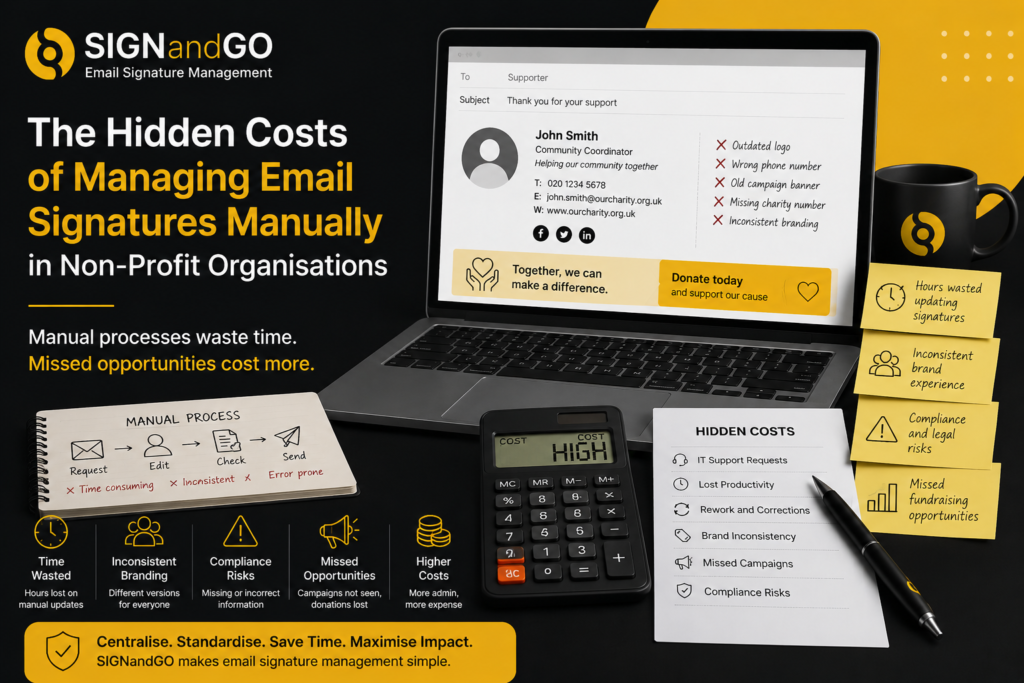
In reality, manually managing email signatures can consume valuable staff time, create branding inconsistencies and introduce unnecessary compliance risks.
For organisations already working with limited budgets and resources, these hidden costs can quickly add up.
The Time Spent Updating Individual Signatures
Every time someone changes their role, telephone number or office location, their email signature needs updating.
Multiply this across dozens or hundreds of employees and volunteers, and the administrative workload becomes substantial.
Common updates include:
- New starters
- Staff departures
- Job title changes
- Department restructures
- Rebranding exercises
- New fundraising campaigns
When updates rely on individual users, they are often delayed or forgotten entirely.
IT Teams Become the Default Support Desk
Although email signatures seem straightforward, many users struggle to edit formatting correctly.
IT departments frequently receive requests to:
- Add logos
- Correct fonts
- Resize images
- Insert disclaimers
- Update hyperlinks
- Troubleshoot Outlook formatting issues
Each support request consumes time that could be better spent on higher-value projects.
For charities with small internal IT teams, these interruptions create unnecessary pressure.
Inconsistent Branding Weakens Your Organisation
Your email signature is often the final thing a recipient sees before replying.
If every employee uses a different design, it can undermine the professionalism and credibility of your organisation.
Common inconsistencies include:
- Different logos
- Outdated colour schemes
- Mixed font styles
- Missing contact information
- Incorrect website links
A fragmented appearance can make even well-established charities look disorganised.
Volunteers and Temporary Staff Increase Complexity
Many non-profit organisations rely on volunteers, seasonal workers and temporary contractors.
These users may:
- Create their own signatures
- Use outdated templates
- Omit important branding
- Forget to include charity registration details
Without central oversight, maintaining consistency becomes almost impossible.
The larger your organisation grows, the harder manual management becomes.
Fundraising Opportunities Are Lost
Every email your organisation sends could help promote an active campaign.
When signatures are managed individually, there is no guarantee employees will update banners or include the latest fundraising message.
As a result:
- Donation opportunities are missed
- Events receive less visibility
- Awareness campaigns reach fewer people
- Marketing teams lose a valuable communication channel
Central management ensures every outbound email supports current organisational priorities.
Compliance Risks Can Increase
Many charities include legal information or registration details within their email signatures.
If employees accidentally delete or alter this information, compliance standards may not be met.
Manual editing also increases the likelihood of:
- Broken links
- Incorrect contact details
- Missing disclaimers
- Outdated branding assets
A centrally controlled template helps ensure approved content appears consistently across all users.
Onboarding and Offboarding Become More Complicated
When new employees or volunteers join, they need access to an approved signature.
When people leave, their branding should be removed immediately.
Managing this process manually often leads to delays and mistakes, particularly in larger organisations with multiple departments.
Automated signature deployment streamlines onboarding while reducing administrative effort.
Campaign Updates Become a Major Project
Fundraising campaigns evolve throughout the year.
Whether promoting a seasonal appeal, charity event or awareness initiative, communications teams often need to replace banners and messaging quickly.
Without centralised management, updating hundreds of individual signatures is impractical.
Some users will forget.
Others will make formatting errors.
Some may never update their signature at all.
The result is inconsistent messaging and reduced campaign effectiveness.
Why Centralised Email Signature Management Makes Sense
Instead of relying on individual users, centralised email signature management allows administrators to control branding, layouts and promotional content from one location.
For charities using Microsoft 365, this approach offers several advantages:
- Consistent branding across all users
- Automatic population of employee details
- Faster onboarding and offboarding
- Organisation-wide campaign updates
- Reduced IT support requests
- Better control over compliance information
It also gives communications teams confidence that every email reflects the organisation professionally.
How SIGNandGO Helps Non-Profit Organisations
SIGNandGO provides a central platform for managing Microsoft 365 email signatures across charities and non-profit organisations.
Templates can automatically pull user information while maintaining approved branding, legal wording and campaign banners.
When updates are required, administrators can deploy changes across the entire organisation without relying on employees or volunteers to make manual edits.
This reduces administration, supports consistent communications and allows internal teams to focus on activities that create greater impact.
Signs Your Charity Has Outgrown Manual Email Signatures
You may benefit from centralised management if:
- Employees use different signature formats
- Campaign banners are rarely updated
- IT regularly edits Outlook signatures
- Volunteers create their own versions
- Contact information is often incorrect
- Branding differs between departments
- Signature changes take days or weeks to implement
If any of these sound familiar, your current process is likely costing more time than you realise.
Frequently Asked Questions
Why are manual email signatures difficult to manage?
Because they rely on each individual user making updates correctly and consistently, which becomes increasingly difficult as organisations grow.
Can charities automate email signatures in Microsoft 365?
Yes. Platforms such as SIGNandGO allow administrators to centrally manage and automatically deploy branded email signatures across Microsoft 365.
Do centrally managed signatures reduce IT workload?
Yes. Automated deployment eliminates many common support requests relating to signature formatting and updates.
Can fundraising banners be managed centrally?
Absolutely. Campaign banners can be updated once and applied across every user’s signature without requiring manual changes.
Is centralised email signature management suitable for volunteer organisations?
Yes. It ensures volunteers and employees use consistent branding while simplifying administration for internal teams.
Save Time and Strengthen Your Brand with SIGNandGO
Manual email signature management may seem manageable at first, but the hidden costs increase as your organisation grows.
By centralising email signatures across Microsoft 365, charities can reduce administrative overhead, improve brand consistency and ensure every email supports their wider communications strategy.
SIGNandGO makes it simple to deploy professional, compliant and fully branded email signatures across your organisation from one intuitive platform.
Book a demo today to see how SIGNandGO can simplify email signature management for your charity or non-profit organisation.